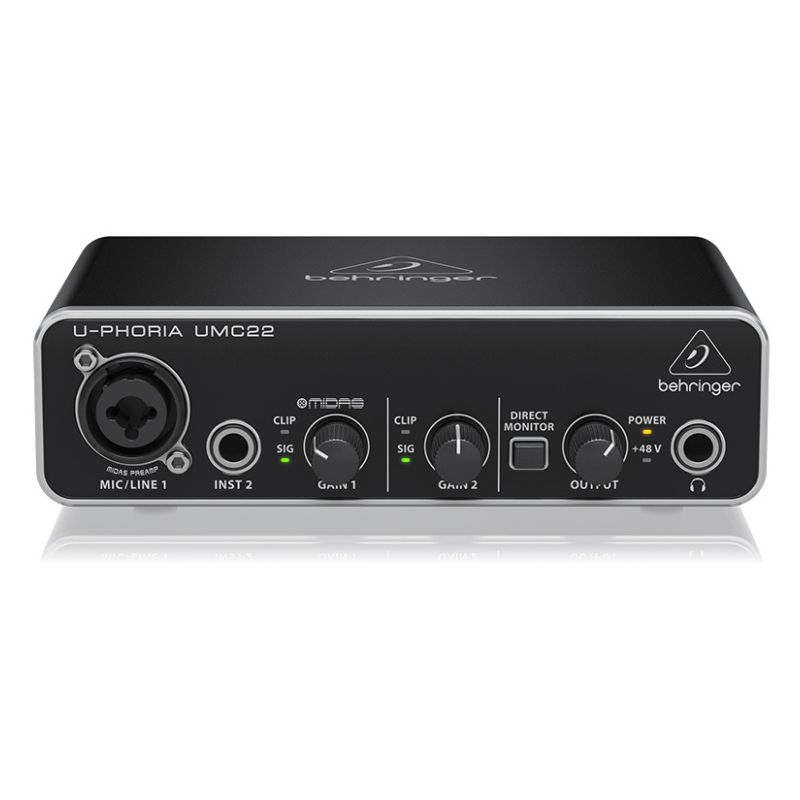
Behringer U-Phoria UMC22 Usb Audio Interface
$ 90.23
The Behringer U-Phoria UMC22 is a Highly Popular, Budget-Friendly USB audio interface Designed for Home studios, podcasters, and musicians looking for a simple, no-frills recording setup. Front and Rear Panel Layout Front Panel Input 1 (Combo Jack): Accepts either an XLR cable (for microphones) or a 1/4″ jack (line level). This channel runs through the premium MIDAS preamp. Input 2 (Inst 1/4″): A dedicated high-impedance (Hi-Z) input specifically calibrated for direct recording of electric guitars, bass, or keyboards. Gain Controls: Separate physical knobs for Gain 1 and Gain 2, complete with Clip and Signal LED indicators to help you avoid digital distortion. Direct Monitor Button: Routes the incoming input signal directly to your headphones/monitors with zero latency, letting you hear yourself without any processing lag from your computer. Phones & Output Knobs: Dedicated independent controls for your headphone volume and master studio monitor volume. Rear Panel USB Port: Type-B USB port for data connection and power. 48V Switch: A physical toggle to turn on phantom power for condenser microphones. Output Left/Right: Two 1/4″ TRS ports to connect directly to your active studio monitors. Performance & Audio Quality The MIDAS Preamp The standout feature of the UMC22 is the MIDAS-designed microphone preamp on Channel 1. MIDAS is legendary in the live sound and console industry. In this budget interface, the preamp provides remarkably clean amplification with decent headroom and very low noise floor compared to generic entry-level interfaces. 16-bit / 48 kHz Resolution Unlike its bigger brother (the UMC202HD, which handles 24-bit/192kHz), the UMC22 maxes out at 16-bit / 48 kHz. What this means: 48 kHz is standard DVD/Video quality, and 16-bit is standard CD quality. It is perfectly adequate for standard tracking, demo production, and podcasting, though it offers slightly less dynamic headroom for heavy post-processing than a 24-bit interface. Driver & Latency On macOS, the UMC22 is class-compliant and works flawlessly plug-and-play using Core Audio. For Windows, Behringer officially recommends using the generic ASIO4ALL driver to achieve low-latency performance within DAWs (like Pro Tools, Cubase, or Reaper). Best For Beginner musicians Guitar and vocal recording Podcasting Streaming Home studio setups on a tight budget Songwriting and demo production Pros and Cons Highly Affordable: One of the most wallet-friendly entry points into clean audio recording. MIDAS Preamp: Channel 1 sounds punchy, clear, and punches well above its price tag. Heavy-Duty Build: The metal casing feels premium and road-ready. Direct Monitoring: Zero-latency hardware monitoring is a lifesaver when tracking vocals or guitars. Limited to 16-bit/48kHz: Missing the extra dynamic depth and high-resolution capabilities of 24-bit interfaces. No Dedicated Windows Driver: Relying on ASIO4ALL can sometimes require extra troubleshooting during DAW setup on PC compared to proprietary drivers. Shared Phantom Power: Turning on 48V applies it only to the XLR input, which is standard, but you can only record one microp Category: Audio Interface